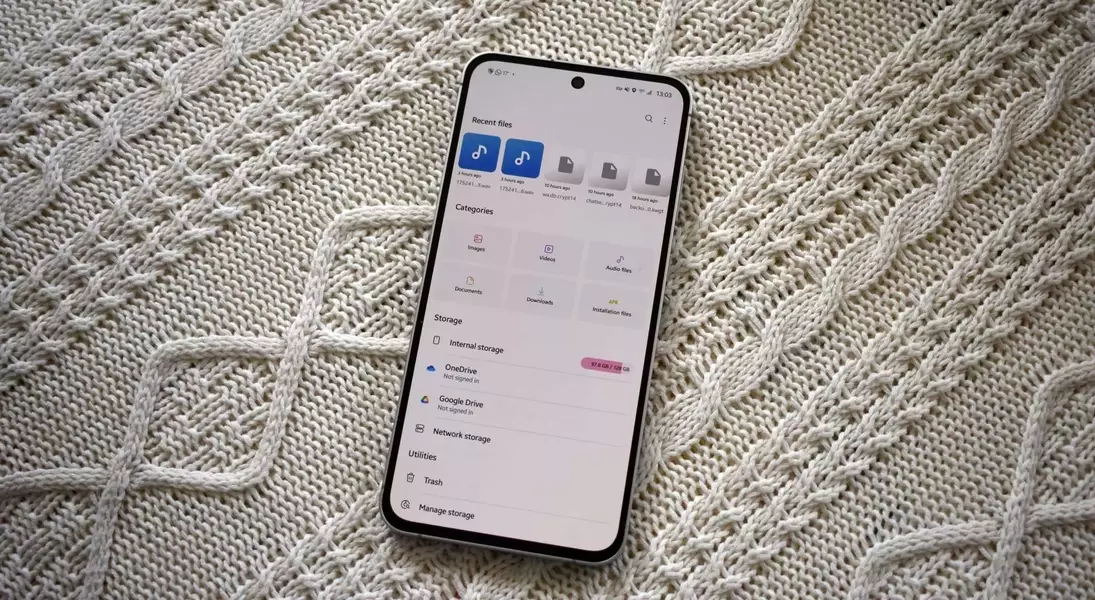
When examining default file management applications on Android devices, Samsung's proprietary 'My Files' tool stands out as a remarkably versatile and powerful solution, often surpassing Google's native 'Files by Google' application found on Pixel smartphones. Despite the clean and swift nature of the Pixel's Android 16 operating system, a notable gap in software functionality emerges, particularly in file handling. This discrepancy becomes evident in features such as network attached storage (NAS) integration and sophisticated search mechanisms, where 'My Files' offers a significantly more comprehensive and user-friendly experience, making it a preferred choice for many power users.
A critical advantage of Samsung's 'My Files' application lies in its exceptional support for network storage solutions. For individuals who frequently interact with a NAS or file server, the ability to seamlessly connect and browse these external storage units is paramount. 'My Files' addresses this need effectively through its Network Storage Manager, facilitating connections to FTP servers and various network shares via SMB. The setup process is streamlined, with an integrated wizard capable of automatically detecting potential shares on the network. Once credentials are provided, users can effortlessly navigate their network shares, experiencing rapid and lag-free browsing, even when streaming videos through the application's built-in player. This contrasts sharply with 'Files by Google', which, while offering cloud storage integration like Google Drive, lacks direct support for network storage options, limiting its utility for users with on-premise data. Furthermore, 'My Files' extends its cloud compatibility to include OneDrive, a valuable addition for users entrenched in the Windows ecosystem.
Beyond network connectivity, 'My Files' demonstrates a superior approach to file search and retrieval, an area where Google's application, surprisingly, falls short. Traditional file managers often restrict searches to file titles, making it challenging to locate documents when only their content is remembered. Samsung's 'My Files' addresses this by providing a 'Search inside files' feature, enabling users to search for specific keywords within documents, including PDFs. This advanced capability proves invaluable for pinpointing documents like invoices, even when their exact filenames are forgotten, a functionality absent in 'Files by Google'. Moreover, the navigation experience within 'My Files' is enhanced by a 'breadcrumb' menu, which allows users to quickly jump between different directory levels, saving time and effort compared to the multi-tap 'back' navigation required in 'Files by Google'.
While 'My Files' clearly excels in these crucial areas, 'Files by Google' does offer its own set of unique advantages. One notable feature is the 'Safe Folder', a secure, PIN or pattern-locked repository for sensitive files that can even be hidden from the app interface, providing a layer of privacy currently unmatched by 'My Files'. Additionally, 'Files by Google' integrates seamlessly with Google's ecosystem, offering direct shortcuts to 'Quick Share' for rapid file transfers between devices and a built-in scanning utility, useful for those who don't wish to install a separate scanning application. For Google Photos users, 'Files by Google' provides intelligent storage management tools, such as an automatic image cleaner that identifies and removes duplicate photos, optimizing device storage. From an aesthetic perspective, 'Files by Google', with its Material 3 Expressive design, presents a visually appealing, clean, and intuitive interface, characterized by smooth animations and a clutter-free layout, which some users might find more appealing than Samsung's offering.
In summary, while 'Files by Google' boasts a polished aesthetic and useful integrations within the Google ecosystem, Samsung's 'My Files' emerges as the more capable and feature-rich stock file manager, particularly due to its robust network storage capabilities and advanced in-document search functionality. However, it's worth noting that for users requiring even more granular control and a broader array of features, third-party file management applications available for Android devices often surpass both default options. Nevertheless, if restricted to a pre-installed solution on a Pixel device, the enhanced utility and comprehensive features of 'Samsung My Files' would undeniably be a welcome addition, suggesting a potential area for Google to draw inspiration from its competitor.